New

Ask Fundz from inside Claude.

Any chat model can list who raised, and it hands every competitor the same list. Fundz in Claude answers against your ICP: every signal Fundz holds on a company brought together in one answer, your daily leads ranked against who you sell to, the reasons each one ranked, and the right person to reach. No second tab. No CSV in the middle.

Connect Fundz to ClaudeSee what you can ask

New recipe: this week’s raises in your territory, straight into a Google Sheet

2 min, real account. Daily leads, why the top one scored 91, what is moving in their buyers’ world, and the draft in Gmail.
Recipe

Fundz inside Claude: this week’s raises in your territory, straight into a Google Sheet

Everyone on your team already gets funding alerts. An alert is one signal, landing in an inbox, with no idea who you sell to. What a rep actually needs is a working list: the companies in their territory that raised this week, with everything else Fundz holds on each one fused in, scored to your ICP, and the person to call, in a sheet the team can sort and assign. Since October 6, 2026, Claude can write straight into Google Sheets (Anthropic’s Google Workspace connectors, in beta). Connect Fundz next to it and one prompt builds the sheet.

  1. Connect Fundz

    Add the Fundz connector in Claude, steps below. It is included with Pro and Strategic plans and runs as you, with your targeting.

  2. Turn on Google Sheets

    In Claude, open Customize, then Connectors, and connect Google Sheets. On a Claude Team or Enterprise plan, an owner enables it first.

  3. Paste a prompt

    Swap in your own territory and industry. Claude asks before it calls each tool the first time; choose Always allow and it stops asking.

“Find Series A and Series B rounds from the last 7 days in Texas, in Information Technology. For each company, pull the contacts Fundz holds and pick the person who owns sales. Put it in a new Google Sheet, one row per company.”
search_funding_rounds, then get_company_contacts, then Google Sheets
Columns Claude fills from Fundz
CompanyAmount raisedSeriesLocationIndustriesEmployeesDateFundz company linkSales contactTitleDepartmentEmail (where Fundz holds one)LinkedIn
“Add a second tab: VP and CRO appointments in the last 30 days at Information Technology companies in Texas, with where each executive worked before.”
search_executive_changes, then Google Sheets
Columns Claude fills from Fundz
CompanyRoleExecutivePrevious role and companyLocationIndustriesDate
“Get my daily leads, keep the ones in Texas, and add a tab with each company’s score, data confidence, buying stage, the signals behind it and the recommended play.”
get_daily_leads, then Google Sheets
Columns Claude fills from Fundz
CompanyPriorityScore out of 100Data confidenceBuying stageHiring surge or exec hire likelyRecent signalsKey insightsRecommended playTop contactFundz company link
Where Fundz holds no email for the right person, the row says so, and you can ask Claude to spend a contact reveal on that company (150 a month on Pro, 600 on Strategic). The company link on each row opens the full record in Fundz, where, once you connect your network, Fundz shows who you already know there.

You already finish the work in Claude. Now it starts there too.

The research, the qualifying, the first draft. That part already happens in an AI tool. What did not move was the data: you looked signals up somewhere else and pasted them in. Connecting Fundz closes that gap. Claude queries your Fundz account directly, with your targeting, your saved filters and your entitlements, and then writes the email in the same breath.

This is the same advantage the rest of Fundz is built on. Anyone can generate an email now. What no chat model holds is what happened in your market this morning, stacked on each company and ranked against who you sell to. A connector does not make you faster at writing. It puts the right company, the reason and the person in the conversation where you already write.

What you can ask

Every example below runs against a tool the connector actually exposes. These are not illustrations.

“Show me my daily leads, then tell me why the top one scored what it did.”
The whole scoring record, not just the number: match score and data confidence, buying stage, hiring and exec-hire forecasts, the modelled probabilities, and the signals that actually drove it. This is the reasoning the lead inbox shows, answered in a sentence.
“Before I pitch them, what is moving in their buyers’ world?”
Not what happened to the prospect, but what happened to the people who buy from the prospect. A company whose customers just seated new decision makers has a reason to talk to you, and you can open with the list instead of a pitch.
“Which companies in my daily leads raised a Series A this month?”
Reads your scored daily leads and cross-checks the funding feed, the two things you would otherwise open in separate tabs.
“Change my targeting to B2B fintech, 200 to 1,000 employees, US only.”
Rewrites your ICP from that sentence. No settings screen, no checkboxes, and every lead after it is scored against the new profile.
“Find VP Sales appointments at healthcare software companies in the last 30 days.”
A new VP Sales is a budget and a mandate. This is the search that finds them before the hire shows up on LinkedIn.
“Is Sequoia worth approaching, and how would we actually get in?”
Returns the real intake route with its source, not a guess: warm intro only, open application or scout programme. Then the deal record behind it.
“What changed on the sites I am watching this week?”
FundzWatch changes: pricing edits, new pages, quiet repositioning, summarised rather than diffed by hand.
“Tell me everything about Overfuel, then add them to my watchlist.”
One call returns the funding history with investors, the exec moves, the product launches and the SEC filings. The next one saves the company. Reading and acting, in the same breath.
“Show acquisitions over $50M in my industry since August.”
Every acquisition is a displaced incumbent and a re-opened vendor decision.
“Who do I call at these, and draft the email.”
Reads the contacts Fundz already holds, spends a reveal only where we hold none, then writes the outreach. The whole campaign without leaving the conversation.
“Draft outreach to the three best-fit companies in today’s leads.”
The point of the whole thing: the ranked company, the reason and the writing happen in one place.

“Can’t I just ask an AI for recent funding rounds?”

You can, and it will answer. It is worth being precise about what you get.

An answer everyone else can get is not an edge

Ask any model for last week’s rounds in your region and it returns the same list to you and to every competitor who asks. If everyone gets the same list, the list is not the advantage.

Fundz answers against your targeting, your saved filters and the accounts you already worked. That is not a list. It is your list.

A filing feed is one signal, and only when you look

Pulling from EDGAR works, and plenty of good operators do it. But a filing tells you money moved. It does not tell you a VP Sales started on Monday, that they just acquired a competitor, or that they opened a second office.

And one signal, fetched on its own, is a coincidence. The reason to call is the stack.

TuesdayRaised a Series A.
9 days agoHired a VP of Sales.
Last monthOpened a second office.

Any one of those is a reason to call. All three inside ten days is a company that is actually buying. One signal is a guess. Stacked signals, matched to who you sell to and delivered with the person to call, are a reason.

Connect it in about two minutes, no technical setup

You need an active Pro or Strategic plan. The connector reads the same entitlements as your account. Developers running it headless can send an fz_ API key as a Bearer token instead of signing in; contact support@fundz.net for one.

  1. Log in to Fundz first

    In the same browser you use for Claude, open app.fundz.net and make sure you are logged in. Claude uses that login in step 6.

  2. Open Connectors in Claude

    Go to claude.ai. In the left sidebar click Customize, then Connectors. (Connectors used to live in Settings; they moved.)

  3. Click Add, then fill in two boxes

    Click Add (top right), then Add custom connector. Type Fundz in Name and https://mcp-app.fundz.net in MCP server URL, exactly that, with nothing after .net. Click Continue.
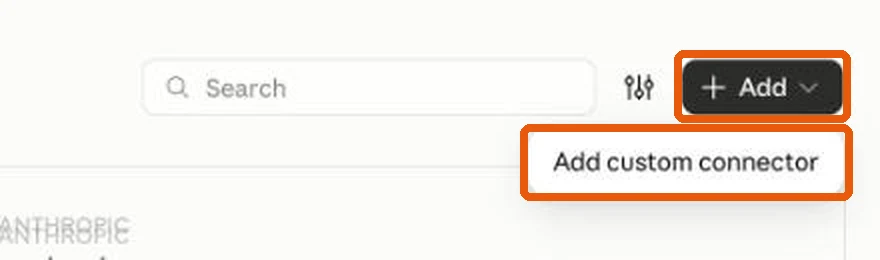
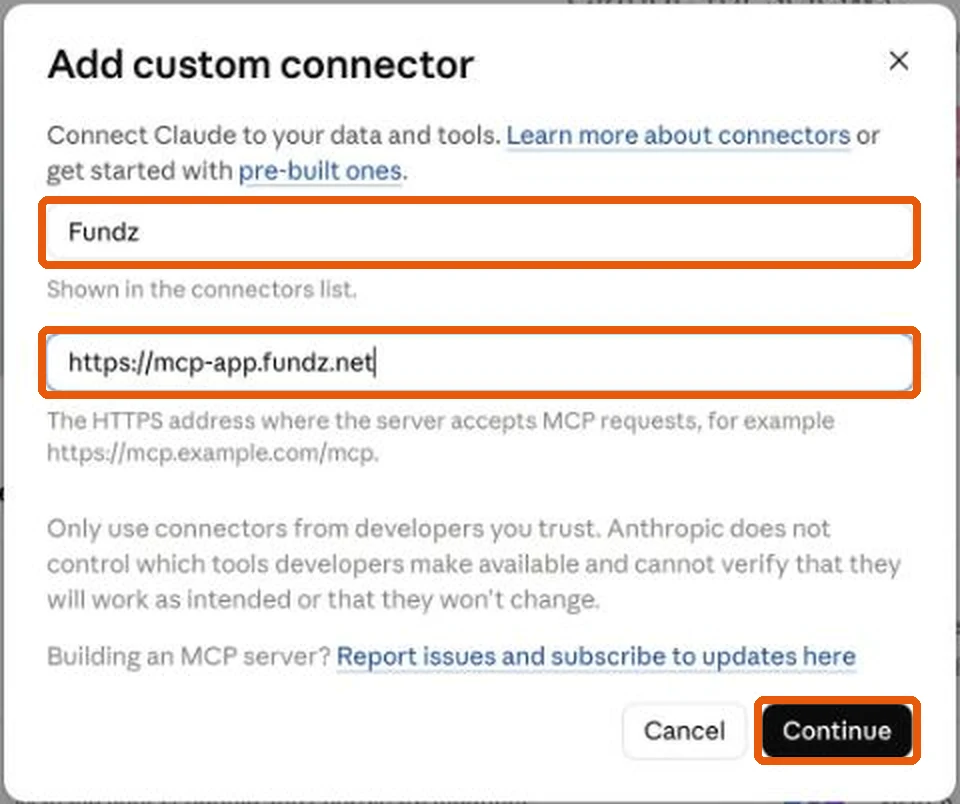
    The Add button and its Add custom connector option, top right of ConnectorsName set to Fundz and MCP server URL set to https://mcp-app.fundz.net, then Continue
  4. Change two settings

    Claude pre-selects two options that do not work with Fundz. Change both:

    Authentication: choose Sign in now (not “No sign-in”, even though Claude marks it “Detected”).

    OAuth client: choose Register automatically (not “Use Claude’s published identity”, even though Claude marks it “Recommended”).
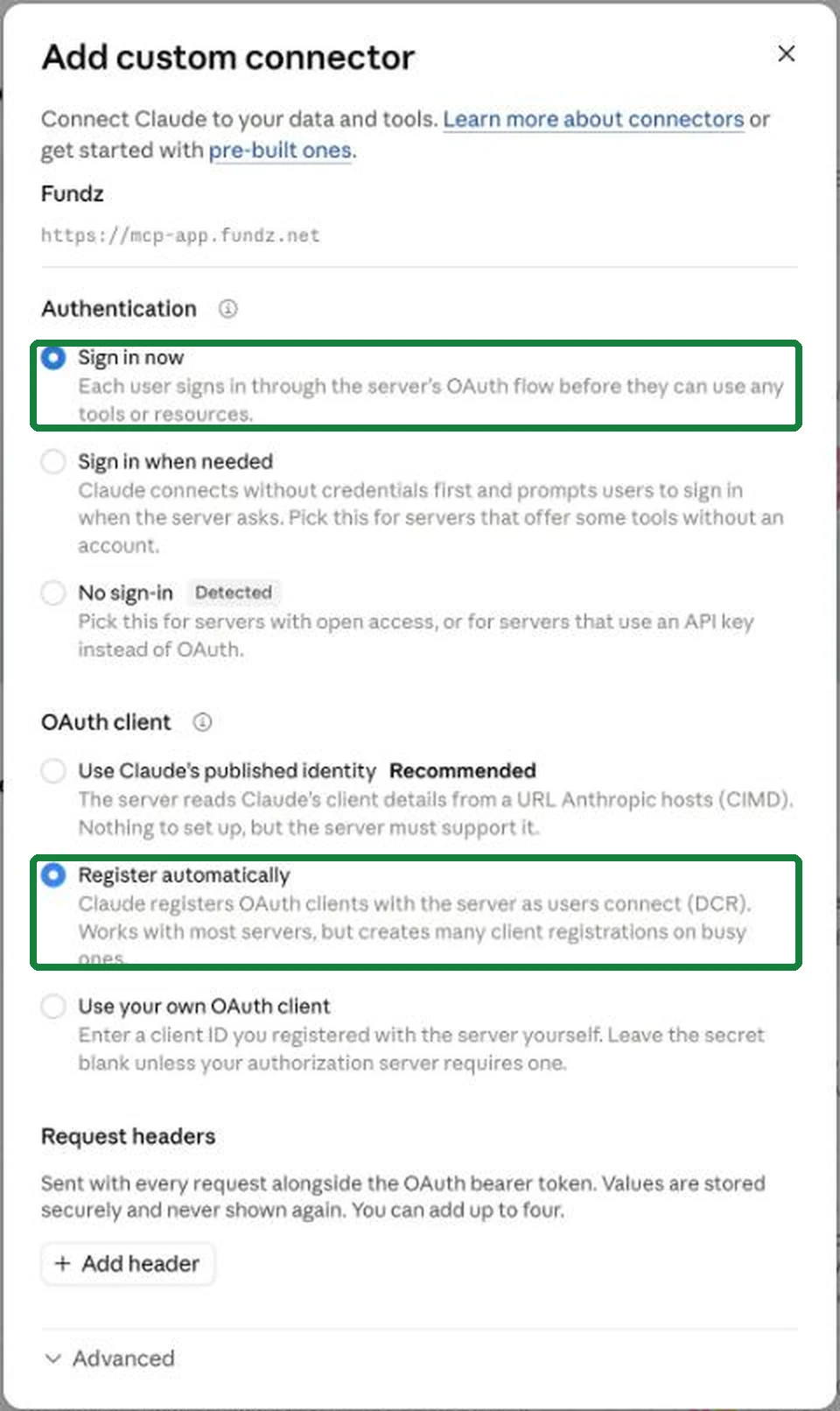
    Sign in now selected under Authentication and Register automatically selected under OAuth client
  5. Scroll down and click Add

    There is no Save button, and nothing saves on its own. The Add button is at the very bottom of the window, below “Request headers” and “Advanced”. Scroll down inside the window until you see it, then click it. If you close the window first, your choices are lost and you start again.
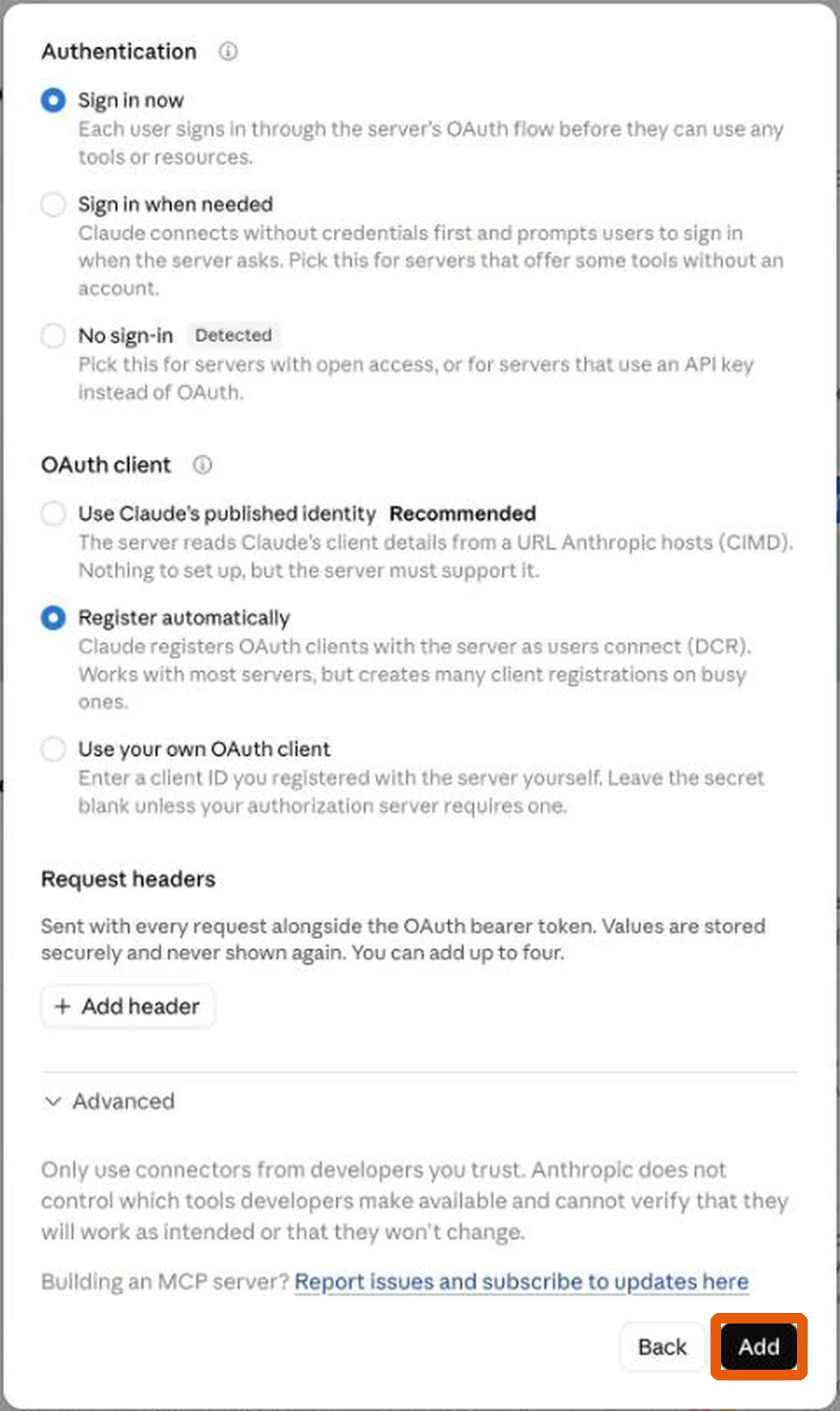
    The bottom of the window after scrolling, with the Add button highlighted
  6. Click Connect

    Fundz now appears in your connector list. Click Connect next to it and approve. The connector runs as you, with your own targeting, saved filters and plan. There is no key to copy and paste.

  7. Ask it something

    In any chat: “what are my daily leads today?”. It reads your real targeting, so the answer is yours, not a demo. The first time Claude uses each Fundz tool it asks your permission. Choose Always allow and it stops asking.

Your other tools are already in Claude. Fundz just joins them.

Fundz decides who to reach and why. It is not the sender. If your sequencer, CRM or inbox has a connector, Claude calls it in the same conversation. There is nothing to wire up between them.

Claude
Add those five contacts to my Series A sequence in Lemlist, and log the companies in HubSpot.
Fundz · get_company_contacts
Lemlist · add_lead
HubSpot · create_company
One prompt, three connectorsIllustrative
Using something without a connector yet? Zapier reaches thousands of apps from inside Claude, and a scheduled Zap can run the same flow unattended when you are not there. Neither is required if your tools are already connected.

Everything the connector can do

Twenty-five tools, covering seven signal types, investor intelligence, the contacts behind them, and your own targeting and saved searches. Reading contacts does not use a reveal; only revealing a new email spends your allowance, which is 600 on Strategic and 150 on Pro.

search_investors
Find any of 37,000+ investors that have actually written cheques in the Fundz data.
get_investor_profile
How a founder actually gets in, plus the deal record: deals, stage mix, median round.
get_company_profile
Everything on one company in a single answer: firmographics plus every signal fused together.
search_sec_filings
Recent 8-K filings with a plain-English AI summary of what actually happened.
search_major_events
Material corporate events by category: leadership, M&A, financial, restructuring.
search_fund_formations
New funds raising capital, from SEC Form D, filterable by minimum amount.
add_to_watchlist
Save a company to your Fundz watchlist. Reversible.
remove_from_watchlist
Take a company back off your watchlist.
get_market_gift
What is moving in a company's BUYERS' world, so you can open with a genuine heads-up instead of a pitch.
get_company_contacts
The people Fundz already holds for a company: name, role, department and email. Reading does not use a reveal.
reveal_contacts
Spends one reveal to find and verify decision-maker emails where we hold none.
get_contact_reveal_quota
How many contact reveals are left this month.
get_daily_leads
Your personalised daily lead recommendations, AI-scored against your ICP.
get_lead_detail
Why one of those leads scored what it did: match score, data confidence, buying stage, hiring and exec-hire forecasts, modelled probabilities, and the recommended play.
search_funding_rounds
The same funding feed as the app: by company, industry, location, series, amount or date.
search_executive_changes
Appointments and departures by role, company, change type and date range.
search_acquisitions
Acquisitions by deal value, acquirer, target and date.
search_products
Product launches, major updates and feature releases by category and company.
search_agreements
Partnership agreements and strategic alliances.
search_crowdfunding
Crowdfunding campaigns by amount, deadline, offering type and portal.
get_saved_filters
The saved searches you built in the web app, with what each one filters on.
get_watchlist_changes
Recent changes on the websites you monitor with FundzWatch.
get_targeting_preferences
Your current industries, locations, company sizes and tracked signals.
update_targeting_preferences
Change your ICP by describing it in plain language.
toggle_email_notifications
Turn the daily email on or off.

Run it on your own pipeline

If you already run your day in Claude, this is the shortest path from a company raising to you being in the conversation.